
HomeLink Wireless Control System

The HomeLink Wireless Control System, located on the driver’s visor, provides a convenient way to replace up to three hand-held transmitters with a single built-in device. This feature will learn the radio frequency codes of most transmitters to operate garage doors, entry gate operators, security systems, entry door locks, and home or office lighting.
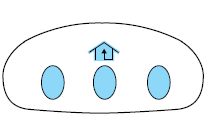
WARNING: When programming your HomeLink Wireless Control System to a garage door or gate, be sure that people and objects are out of the way to prevent potential injury or damage.
Do not use the HomeLink Wireless Control System with any garage door opener that lacks safety stop and reverse features as required by U.S. federal safety standards (this includes any garage door opener model manufactured before April 1, 1982). A garage door which cannot detect an object, signaling the door to stop and reverse, does not meet current U.S. federal safety standards. For more information, contact HomeLink at: www.homelink.com or 1–800–355–3515.
Retain the original transmitter for use in other vehicles as well as for future programming procedures (i.e. new HomeLink equipped vehicle purchase). It is also suggested that upon the sale of the vehicle, the programmed Homelink buttons be erased for security purposes, refer to Programming in this section.
See also:
Driving while you tow
When towing a trailer:
• Turn off the speed control. The speed control may shut off
automatically when you are towing on long, steep grades.
• It is recommended to select the “M” gear position ...
Lincoln custom accessories for your vehicle
A wide selection of Lincoln Custom Accessories are available for your
vehicle through your local Lincoln or Ford of Canada dealer. These
quality accessories have been specifically engineered to fu ...
Deactivating the memory feature
To deactivate this feature:
1. Press and hold either the 1 or 2 control on the driver’s door for five
seconds. (A tone will be heard after 11⁄2 seconds when the memory store
is done) contin ...