
Turn signal control

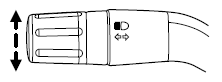
The turn signal lever does not mechanically lock in the upward or downward position when activated. The turn signal control activation and cancellation is electronic.
• To operate the left turn signal,
push the lever down until it stops
and release.
• To operate the right turn signal,
push the lever up until it stops
and release.
• To manually cancel turn signal operation, push the lever again in
either direction.
Lane change
To indicate a left or right lane change:
• Push the lever up/down to the first stop position and release. The turn
signals will flash three times and stop.
• Push the lever up/down to the first stop position and hold. The turn
signals will flash for as long as the lever is held in this position.
See also:
Safety belt extension assembly
If the safety belt is too short when fully extended, a safety belt extension
assembly can be obtained from an authorized dealer.
Use only extensions manufactured by the same supplier as the safet ...
Touchscreen features
If your vehicle is equipped with a touchscreen system, you can access
climate features via the touchscreen and voice commands. Refer to the
Climate Control chapter in your MyFord Touch™ supplement ...
Brake over accelerator
This vehicle is equipped with a brake over accelerator feature. In the
event the accelerator pedal becomes stuck or entrapped, applying steady
and firm pressure to the brake pedal will both slow t ...