
Panel dimmer control

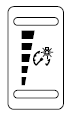
Panel dimmer control
Use to adjust the brightness of the instrument panel and all applicable lit components in the vehicle during headlamp and parking lamp operation.
• Tap the top or bottom of the control to brighten/dim all interior lit components incrementally, or • Press and hold the top or bottom of the control until the desired lighting level is reached.
• Press and hold the top of the control to the full on position to activate the “dome on” feature. This will turn on the interior courtesy lights.
The lights will remain on until the bottom of the control is pressed.
See also:
Instrument panel/interior trim and cluster lens
Clean the instrument panel, interior trim areas and cluster lens with a
clean, damp, white cotton cloth, then use a clean and dry white cotton
cloth to dry these areas.
• Avoid cleaners or poli ...
N (Neutral)
With the gearshift lever in N (Neutral), the vehicle can be started and is
free to roll. Hold the brake pedal down while in this position. ...
Navigation/SYNC system hands-free control features (ifequipped)
Press to active the voice
recognition feature. Refer to Voice
recognition feature in the MyFord
Touch™ / MyLincoln Touch™
supplement.
Press to access phone features.
Refer to Phone f ...