
Sample MP3 structure

If you are burning your own MP3 discs, it is important to understand how the system will read the structures you create. While various files may be present, (files with extensions other than mp3), only files with the .mp3 extension will be played. Other files will be ignored by the system. This enables you to use the same MP3 disc for a variety of tasks on your work computer, home computer and your in-vehicle system.
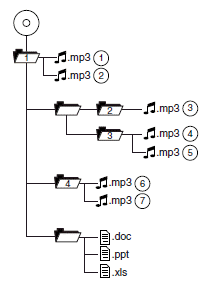
In track mode, the system will display and play the structure as if it were only one level deep (all .mp3 files will be played, regardless of being in a specific folder). In folder mode, the system will only play the .mp3 files in the current folder.
See also:
Accessory delay
With accessory delay, the window switches, audio system and moon roof
(if equipped) may be used for up to 10 minutes after the ignition is
turned off or until either front door is opened. ...
Temperature A B C
The temperature grades are A (the highest), B and C, representing the
tire’s resistance to the generation of heat and its ability to dissipate heat
when tested under controlled conditions on a spe ...
Positive retention floor mat
WARNING: Always use floor mats that are designed to fit the
foot well of your vehicle. Only use floor mats that leave the
pedal area unobstructed. Only use floor mats that are firmly secured to ...