
Satellite radio information

Satellite radio channels: SIRIUS broadcasts a variety of music, news, sports, weather, traffic and entertainment satellite radio channels. For more information and a complete list of SIRIUS satellite radio channels, visit www.sirius.com in the United States, www.siriuscanada.ca in Canada, or call SIRIUS at 1–888–539–7474.
Satellite radio reception factors: To receive the satellite signal, your vehicle has been equipped with a satellite radio antenna located on the roof of your vehicle. The vehicle roof provides the best location for an unobstructed, open view of the sky, a requirement of a satellite radio system. Like AM/FM, there are several factors that can affect satellite radio reception performance:
• Antenna obstructions: For optimal reception performance, keep the
antenna clear of snow and ice build-up and keep luggage and other
material as far away from the antenna as possible.
• Terrain: Hills, mountains, tall buildings, bridges, tunnels, freeway
overpasses, parking garages, dense tree foliage and thunderstorms can
interfere with your reception.
• Station overload: When you pass a ground based broadcast repeating
tower, a stronger signal may overtake a weaker one and result in an
audio mute.
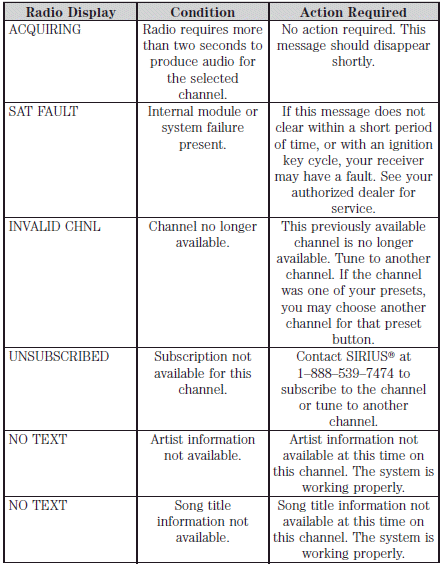
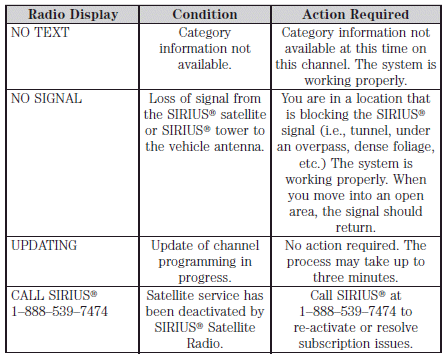
Unlike AM/FM audible static, you will hear an audio mute when there is a satellite radio signal interference. Your radio display may display NO SIGNAL to indicate the interference.
SIRIUS satellite radio service: SIRIUS Satellite Radio is a subscription based satellite radio service that broadcasts music, sports, news and entertainment programming. A service fee is required in order to receive SIRIUS service. Vehicles that are equipped with a factory installed SIRIUS satellite radio system include hardware and a limited subscription term, which begins on the date of sale or lease of the vehicle.
For information on extended subscription terms, the online media player and other SIRIUS features, please contact SIRIUS at 1–888–539–7474.
Note: SIRIUS reserves the unrestricted right to change, rearrange, add or delete programming including canceling, moving or adding particular channels, and its prices, at any time, with or without notice to you. Ford Motor Company shall not be responsible for any such programming changes.
Satellite Radio Electronic Serial Number (ESN): This 12–digit Satellite Serial Number is needed to activate, modify or track your satellite radio account. You will need this number when communicating with SIRIUS . While in satellite radio mode, you can view this number on the radio display by pressing AUX and preset 1 control simultaneously.
See also:
Using speed control
The speed controls are located on the steering wheel. The following
buttons work with speed control:
SET: Press to set a speed or to
increase or decrease the set speed.
RES (Resume): Press t ...
Infant and/or toddler seats
Use a safety seat that is recommended for the size and weight of the
child.
When installing a child safety seat:
• Review and follow the information
presented in the Airbag
supplemental re ...
Disarming the system
You can disarm the system by any of the following actions:
• Unlock the doors by using the remote entry transmitter portion of
your Integrated Keyhead Transmitter.
• Unlocking the doors using the ...