
Operating the HomeLink Wireless Control System

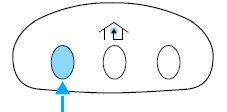
To operate, simply press and release the appropriate HomeLink button.
Activation will now occur for the trained product (garage door, gate operator, security system, entry door lock, or home or office lighting etc.). For convenience, the hand-held transmitter of the device may also be used at any time. In the event that there are still programming difficulties, contact HomeLink at www.homelink.com or 1–800–355–3515.
See also:
Brake-shift interlock
This vehicle is equipped with a brake-shift interlock feature that prevents
the gearshift lever from being moved from P (Park) when the ignition is
in the on position unless the brake pedal is app ...
Resuming the set speed
Press and release the RESUME
control. This will automatically
return the vehicle to the previously
set speed. The set speed will display
continuously in the message center
while ACC is activ ...
Illuminated visor mirror
Lift the mirror cover to turn on the visor mirror lamp.
Slide-on-rod feature
Rotate the visor towards the side window and extend it rearward for additional sunlight coverage.
Note: To stow the ...