
Fuel Economy

Press the right arrow on the left steering wheel mounted button when fuel economy is selected. The boxes in the upper right corner of the screen indicate that there are multiple screens that you can navigate through. Each press of the right arrow will navigate to the next screen until the last screen is reached. The white highlighted box indicates which of the screens you are currently viewing:
Inst. Fuel Economy
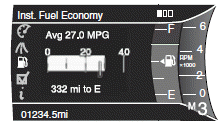
Shown with vertical bar tachometer enabled • This display shows a visual graph of your instantaneous fuel economy. Press the right arrow to reach the other fuel displays and press the left arrow once to return to the previous display.
Press and hold OK to reset the currently displayed fuel information.
XX Min Fuel History
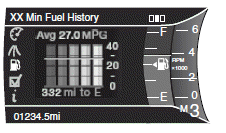
Shown with vertical bar tachometer enabled • This display shows a bar chart of your fuel history, configurable to 5, 10 or 30 minutes. To configure the fuel history, press the right arrow button when in this screen.
Press and hold OK to reset the currently displayed fuel information.
If you calculate your average fuel economy by dividing miles traveled by gallons of fuel used (liters of fuel used by 100 kilometers traveled), your figure may be different than displayed for the following reasons:
• Your vehicle was not perfectly level during fill-up.
• Differences in the automatic shut-off points on the fuel pumps at
service stations.
• Variations in top-off procedure from one fill-up to another.
• Rounding of the displayed values to the nearest 0.1 gallon (liter).
To determine your average highway fuel economy, do the following:
1. Drive the vehicle at least 5 miles (8 km) with the speed control
system engaged to display a stabilized average.
2. Record the highway fuel economy for future reference.
It is important to reset fuel economy after setting the speed control to get accurate highway fuel economy readings.
For more information refer to Essentials of good fuel economy in the Maintenance and Specifications chapter.
See also:
Adding engine coolant
When adding coolant, make sure it is a 50/50 mixture of engine coolant
and distilled water. Add the mixture to the coolant reservoir, when the
engine is cool, until the appropriate fill level is o ...
Determining if the system is operational
The SRS uses a readiness light in the instrument cluster or a tone to
indicate the condition of the system. Refer to Warning lights and
chimes in the Instrument Cluster chapter. Routine maintenanc ...
Vertical aim adjustment
1. Park the vehicle directly in front of a wall or screen on a level surface,
approximately 25 feet (7.6 meters) away.
• (1) 8 feet (2.4 meters)
• (2) Center height of lamp to ground
• (3) 25 ...