
Adaptive cruise control (acc) (if equipped)

Adaptive cruise control (ACC) is much like speed control, only this system is designed to automatically adjust your speed to maintain a proper distance between you and the vehicle in front of you in the same lane. The driver can select from one of four GAP settings, the controls are located on the steering wheel.
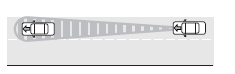
At startup, the system sets the gap to the last selected setting. Once activated, the driver can deactivate the system at any time by pressing the brake pedal, pressing the steering wheel ON/OFF control or pressing the RES/CNCL control. In addition, the driver can temporarily increase the vehicle speed above the current speed by manually pressing on the accelerator pedal.
WARNING: Always pay close attention to changing road conditions, especially when using adaptive cruise control.
Adaptive cruise control cannot replace attentive driving. Failing to follow any of the warnings below or failing to pay attention to the road may result in a collision, serious injury or death.
WARNING: Adaptive cruise control is not a collision warning or
avoidance system. Additionally, adaptive cruise control will not
detect:
• Stationary or slow moving vehicles below 6 mph (10 km/h).
• Pedestrians or objects in the roadway.
• Oncoming vehicles in the same lane.
WARNING: Do not use the adaptive cruise control when entering or leaving a highway, in heavy traffic or on roads that are winding, slippery or unpaved.
WARNING: Do not use in poor visibility, specifically fog, rain, spray or snow.
See also:
Positions of the ignition
1. Off— locks the gearshift lever
and allows key removal. This
position also shuts the engine and
all electrical accessories off.
Note:
In order to switch off the engine
while the vehicle ...
AM/FM in-dash CD6/MP3 satellite compatible Lincoln premium sound/THX audio
system
AM/FM in-dash CD6/MP3 satellite compatible Lincoln premium sound/THX audio
system
WARNING: Driving while distracted can result in loss of vehicle
control, accident and injury. Ford strongly r ...
Brake-shift interlock
This vehicle is equipped with a brake-shift interlock (BSI) feature that
prevents the gearshift lever from being moved from P (Park) when the
ignition is in the on position unless the brake pedal ...