
Information

In this mode, you can view different vehicle system information and perform a system check.
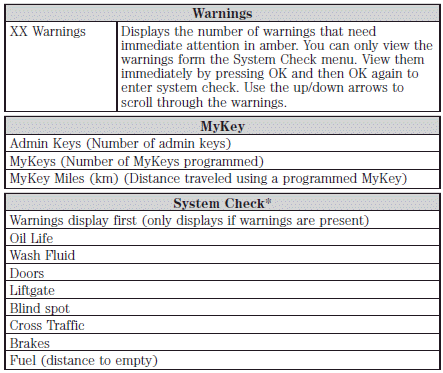
*Some items will only display during a system check if a problem has been detected.
System warnings and status messages
See System warning and status messages later in this chapter for more information.
See also:
Global close windows
You can close the vehicle’s windows and moon roof (if equipped) by
using the control on the remote
transmitter.
Press and hold the control on the transmitter to begin to close the
windows and ...
Collision warning
Collision warning helps prevent common traffic accidents. Forward-looking,
long-distance radar identifies potential obstacles. When the danger of a
collision is detected, the system warns the driver ...
Preparing your vehicle
When the battery is disconnected or a new battery is installed, the
automatic transmission must relearn its shift strategy. As a result, the
transmission may have firm and/or soft shifts. This ope ...