
Securicode™ keyless entry system

The keypad, located near the driver’s window, is invisible until touched and then it lights up so you can see and touch the appropriate buttons.
Note: If you enter your entry code too fast on the keypad, the unlock function may not work. Re-enter your entry code more slowly.
You can use the keyless entry keypad to:
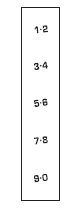
• lock or unlock the doors without
using a key.
• open the trunk.
• recall memory seat/power mirrors
and steering column positions (if
equipped).
• enable or disable the autolock
and autounlock features
• Activate intelligent access (if
equipped) at the driver door,
refer to Intelligent access in this
chapter.
The keypad can be operated with the factory set 5–digit entry code; this code is located on the owner’s wallet card in the glove box and is available from your authorized dealer. You can also create up to three of your own 5–digit personal entry codes.
Note: If your vehicle is equipped with the intelligent access feature, your keypad will still function normally if you enter your personal entry code or factory set code. However, if your transmitter is within range of the driver’s door, an intelligent access unlock will also occur each time you press any number on the keypad. Note that this additional unlock will not impact keypad functionality, and you can still enter your code and perform all keypad functions (unlock, lock, trunk release).
See also:
Erasing personal code
1. Enter the factory set 5–digit code.
2. Within five seconds, press the 1 • 2 on the keypad and release.
3. Press and hold the 1 • 2 for two seconds. This must be done within
five seconds of comp ...
How does the safety belt pretensioner and airbag supplemental restraint
system work?
The safety belt pretensioner and
airbag SRS are designed to activate
when the vehicle sustains
longitudinal deceleration sufficient
to cause the sensors to close an
electrical circuit that ...
Third generation
The 2007 Navigator was unveiled at the Chicago Auto Show in February 2006. It
is joined by a long wheelbase Navigator L based on the Expedition EL and shares
the new Ford T1 platform with that veh ...